

Google Analytics 4 already removes the crawlers on the IAB's list of known bots. An AI agent using a real browser on someone's behalf still loads your page and gets counted as a user. Those visits sit in the same number as people reading the page.
Human Confidence marks every visit High, Medium, or Low. High visits are the most likely to be people. The rules are published, so you can see why a visit got its mark, and no visitor is made to solve a CAPTCHA.
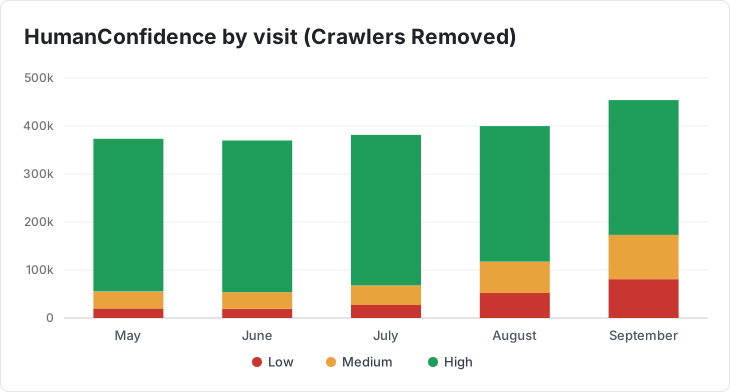
In May, High visits were 318,010. By September they're down to 280,911, while Low has grown from 19,955 to 80,923.
💡 We'd want to know about the fall in High before celebrating the extra traffic.
Send Human Confidence to Google Analytics 4 as a custom dimension and use it as an extra value for grouping visits in your reports. The Property Dictionary lists the crawler properties to send alongside it should you want to filter crawlers that aren't on the established lists. Filter to High for a conversion rate based on visits most likely to be people. That's the filter to use if you want to establish trends.
Step 3 of the configuration page gives you the code to copy and paste into your page, and names the custom dimensions to create in Google Analytics 4. The Google Analytics 4 guide has the setup instructions, including WordPress. Human and bot traffic in your analytics covers what to send and what to look at in any analytics tool.