

E-commerce
Your investment in advertising and marketing is about to pay off. Why let a frustrating website experience, or bots posing as shoppers, undo all your hard work? Whatever device your customers are using to seal the deal, our real-time data services turn your e-commerce website into a conversion machine.
Talk to usHow 51Degrees helps online retailers
- Smooth user journeys. Remove the friction that frustrates users and causes cart abandonment. Detect location to auto-fill addresses on checkout, verify country, and more. With real-time data, you can make customers' lives so much easier. Experience address auto-fill in action when you contact us.
- Personalized experiences. Speed and personalization matter more than ever. Show customers your brand at its best with fast-loading, optimized content and personalized promotions based on their specific location or device properties (like model, OS, or price band).
- Mobile magic. The way a person shops on mobile compared to desktop is very different. With more shopping taking place on the go, use device detection and adaptive design to serve a site that's tailor-made for the specific devices and behaviors of mobile users. Check out our pricing page on both mobile and desktop to experience this in action!
- Shopper insights. Add new dimensions to your analytics. See which devices generate more value for your business and spot problem areas. Understand how screen size, CPU performance, and device price impact conversions, then test and learn to continually improve. It's easy to add to Google Analytics or any other existing solution.


Human Confidence
Boom, or bots? Traffic up this month? Before you celebrate, check how much of it is people. Human Confidence rates every visit High, Medium, or Low.
Don't you want to know? Put the rating in the analytics you already use and the chart below is what you'd see, month by month. Then decide what each kind of visit gets.
| Value | Meaning | |
|---|---|---|
 |
High | A person is reading the page. |
 |
Medium | Mixed signals. Could be a person, could be a script. |
 |
Low | Almost certainly no person is reading it. |
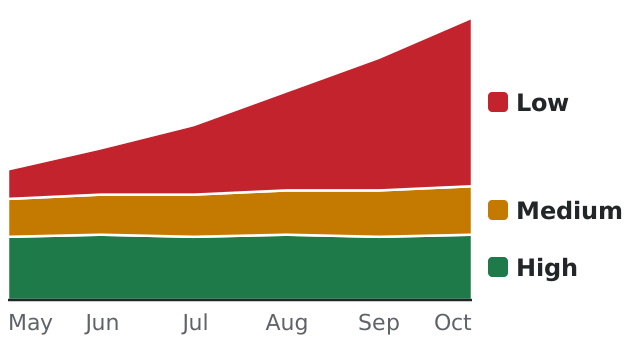
90%
of a travel website's traffic from new visitors was AI crawlers and agents by August this year. In June it was under 1%.
47%
of the visits to one website in one week still weren't human, after the crawlers that declare themselves were taken out.
What the scrapers are after
At the travel website, a few of those AI visitors looked like agents planning trips for real people. Most looked like they were checking prices and availability, probably for a rival or a price-tracking service.
A scraper copies your catalog, prices included, and takes it to a rival. Your analytics counts it as a shopper who didn't buy. Scrapers run real browsers now, so they look like shoppers, and no list of crawler names will catch them. That's the point of them.
Be found, not copied.
Search engines are bots, and you want them. They give their names, our crawler detection recognizes them on every plan for free, and a robots.txt from us tells them what they may index. AI agents are different again. One buying for a customer may be about to pay. Some big retailers welcome them and others block them. What those agents see on your website is up to you.
How you'd use it
Your developers add it. You decide the rest.
1
Add it to your pages
Your developers add our script and every visit comes back rated. The "recipe" below and our quick start show them where it goes.

2
Look at the numbers
Start in your analytics. Nobody visiting notices, and after a few weeks you'll know how much of your traffic is people. We did it in that order on our own website.
3
Decide what each visit gets
The obvious start is to let the search engines in and show prices to High. For Low, the choice is between a page made for AI, without the prices, and no page at all. Medium can be asked to sign in first if the scraping is costing you.
Are you counting the scrapers?
Scrapers read every page and buy nothing, and you still pay the hosting bill to serve them. With the rating on every visit, the shoppers see your prices and the scrapers get a page with no prices on it. Your reports start counting buyers.
Human Confidence comes with Pro, our cloud service, bought online with a card, or with Bespoke, which runs on your own servers in a Docker container and starts with a conversation.
4 ways our superpowers help your e-commerce business
Is that a person, or an AI agent browsing? Human Confidence answers before the page is served
Some AI agents are shopping for a real person. Scrapers aren't shopping at all, they're copying. Both drive a real browser, so neither looks like a crawler, and your server should treat them differently. Give High the prices and keep them from Low. What Medium gets is your decision, and a sign-in is the usual answer when the scraping hurts.
Nine bots and one shopper show up in your logs as ten browsers. Human Confidence picks out the shopper, and your traffic report starts counting buyers.
Who it serves. Retailers, and anyone else whose website should serve people first.
Pairs well with , for the full traffic investigation.
Integration time. 30 minutes in any Pipeline API integration.
Ingredients, 5
- HumanConfidence
- IsCrawler
- CrawlerName
- CrawlerUsage
- IsArtificialIntelligence
Hero ingredient. HumanConfidence Scraper or shopper? Adapt to every request.
- Read Human Confidence on every page view
- High means a person is reading the page. Serve the prices.
- Low gets no prices, or no page.
- Decide which AI agents you welcome. Some are shopping for a real person.
Chef's tip. Keep the rating in the session for half an hour, so you aren't asking the cloud on every page.
Strain the bots out before they cost you money
Crawlers that announce themselves are easy. The crawler properties name them and say what they're for, and your robots.txt handles them. The hard ones drive a real browser or come through a data center, a VPN, or a proxy, and most analytics count every one as a visitor. Human Confidence rates whatever is left once the named crawlers are out, and the network properties say where it came from.
Who it serves. Anyone whose analytics or ad spend leaks to bots.
Pairs well with Spot the fake, to verify the device behind every suspicious request.
Integration time. 30 minutes in any Pipeline API integration.
Ingredients, 10
- IsCrawler
- CrawlerName
- CrawlerUsage
- CrawlerProductTokens
- IsArtificialIntelligence
- HumanConfidence
- IsVPN
- IsProxy
- IsHosted
- HumanProbability
Hero ingredient. HumanConfidence Know who is looking at your prices before you show them.
- Pass every request through IsCrawler
- Strain out the bots that say who they are, by name and usage
- Add IsArtificialIntelligence for the AI scrapers and agents
- Read Human Confidence for whatever is left
Chef's tip. Check IsCrawler first. It's free on every plan and names most of the bots before Human Confidence has to rate anything.
Fewer fields, fewer abandoned carts
The IP address says where the visitor is, down to the town, and which currency, language, and time zone go with it. Pre-fill the address form and default the currency, shipping, and tax. The page comes up in the customer's own language, and they have not typed anything yet.
Who it serves. Retailers fighting cart abandonment.
Pairs well with , to personalize the journey before they reach the checkout.
Integration time. One afternoon in your checkout flow.
Ingredients, 11
- Country
- CountryCode
- State
- Town
- Latitude
- Longitude
- AccuracyRadiusMin
- CurrencyCode
- LanguageCode
- TimeZoneIana
- ConnectionType
Hero ingredient. CurrencyCode Show the right currency on the first page and fewer people give up at the checkout.
- Resolve the visitor's location from their IP
- Pre-fill country, state, and town in the address form
- Default the currency, shipping options, and tax to match
- Serve the whole thing in the customer's language
Chef's tip. Pre-fill, don't lock. Let the shopper change the country if the IP puts them somewhere they aren't.
The phone in their hand says what they'll spend
Price band, model, and device age are three things a shopper tells you before they've typed a word. Put them in your analytics and look at which devices fill the biggest baskets.
Who it serves. Merchandising and analytics teams.
Pairs well with , to turn shopper insights into faster, more personal checkouts.
Integration time. 30 minutes to add the dimensions to your analytics.
Ingredients, 10
- PriceBand
- ReleaseYear
- ReleaseAge
- HardwareModel
- HardwareName
- ScreenInchesDiagonal
- PixelRatio
- PlatformName
- PlatformVersion
- BrowserName
Hero ingredient. PriceBand What the shopper paid for their phone, which says a lot about what they'll pay you.
- Add device price band and model as dimensions in your analytics
- Correlate device value with basket size and conversion
- Change the promotions when the numbers say so
- Test, taste, repeat
Chef's tip. A shopper on a $1,200 phone and a shopper on a $120 phone see the same homepage. Should they?
Pick the one closest to your business
The story is for you and the "recipe" for your engineers, with the properties they need and a link to create their Resource Key.